

Activate and manage VeriFactu
VeriFactu is a compliance system designed to simplify the adaptation process to the invoicing requirements established by the Anti-Fraud Law. It ensures that all invoices generated by companies are securely transmitted to the Tax Authority (AEAT) to be verified for integrity and authenticity by both the AEAT and the customer.
How does VeriFactu work?
Section titled “How does VeriFactu work?”VeriFactu involves the immediate and real-time submission of invoice data to the AEAT at the moment it is generated. This process ensures that no modifications can be made once the invoice has been issued, thus guaranteeing its integrity and security. Additionally, the invoice will include a QR code that allows the recipient to verify its fiscal validity through the AEAT platform.
How to activate VeriFactu in B2Brouter
Section titled “How to activate VeriFactu in B2Brouter”To activate the VeriFactu service, you need an active subscription to a Premium Plan (Professional, Business or eDocExchange). However, with a Basic Plan you can also activate it, although with a limited number of tax submissions.
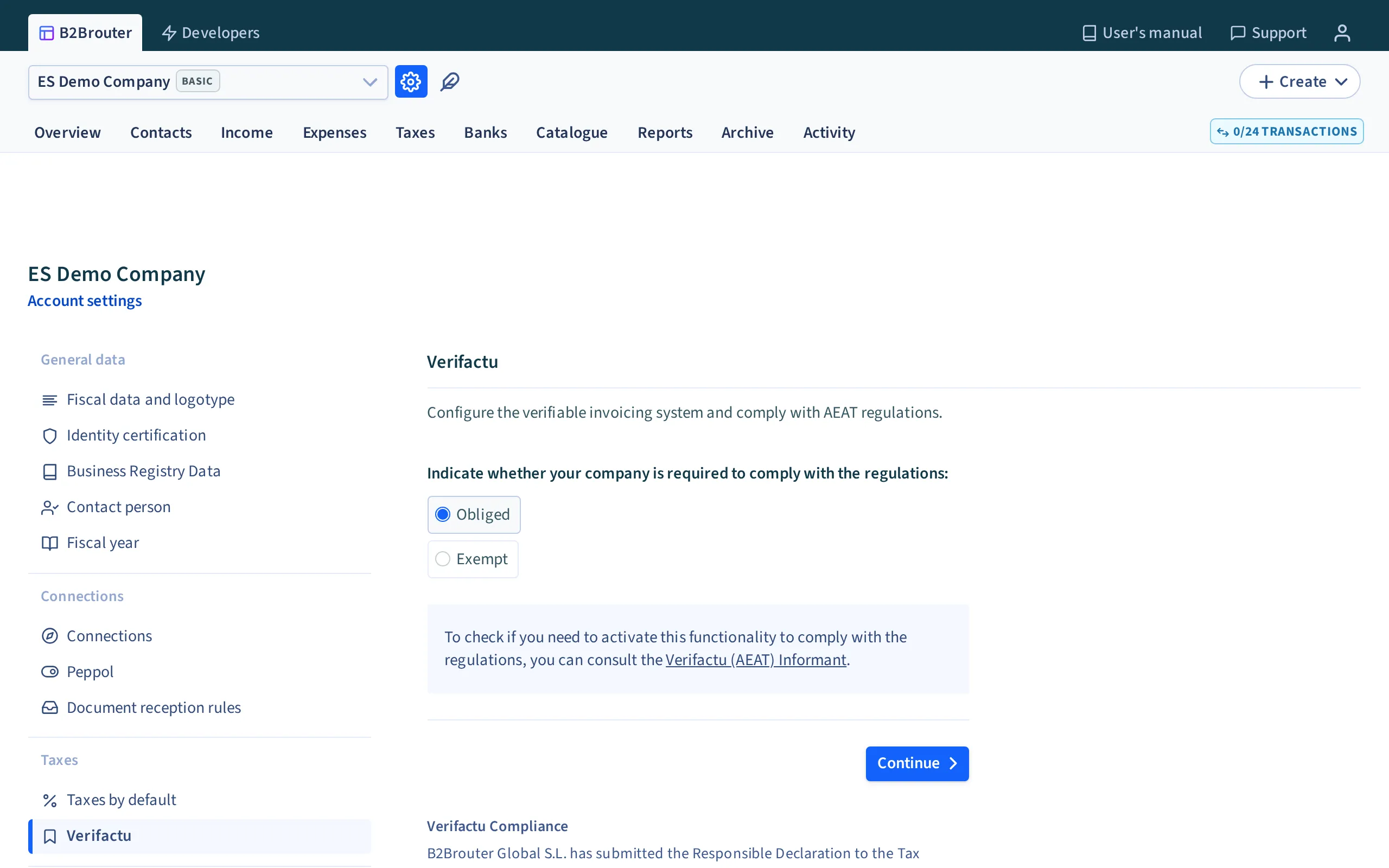
- Click the gear icon located at the top of the screen and select Account settings.
- Go to the Taxes section in the side menu and open VeriFactu.
- Select the option I want to activate VeriFactu.
- Carefully read the section Important information before activating VeriFactu.
- Check the box I authorize B2Brouter as an AEAT Social Collaborator. Once checked, the Activate VeriFactu button will be enabled.
- Click the Activate VeriFactu button.
- Once activated, a box will appear showing the date and time when VeriFactu activation started.
When can and can't I activate it?
Section titled “When can and can't I activate it?”You can activate VeriFactu when your company is ready to report all issued invoices to the AEAT from the activation date onward. Before confirming activation, review these points carefully:
Subscription plan
Section titled “Subscription plan”With a Premium Plan, you can use VeriFactu as part of your regular subscribed service. With a Basic Plan, you can also activate it, but with a limited number of tax submissions. If you expect a recurring submission volume, it is best to confirm first whether your current plan is sufficient.
Company postal code
Section titled “Company postal code”If your company postal code is invalid, the interface blocks VeriFactu activation. Before trying again, review your company tax details and correct the postal code if needed.
When it is better not to activate it yet
Section titled “When it is better not to activate it yet”Do not activate it if you are still testing with real invoices or if you are not yet sure from which date you will start reporting all invoices through this system. Once activated, the commitment with the AEAT is irreversible and affects all invoices issued from the start date.
To test the connection of your ERP or integration, use the sandbox: it does not use real invoices and sends nothing to the AEAT.
Important information before activating VeriFactu
Section titled “Important information before activating VeriFactu”VeriFactu cannot be deactivated
Section titled “VeriFactu cannot be deactivated”Once you activate VeriFactu, you commit to the AEAT to submit the declaration for every invoice you generate. This commitment is irreversible.
Start date
Section titled “Start date”The date you activate VeriFactu will be the official start date of your commitment to the AEAT to declare all invoices issued from that moment onward. This date cannot be changed.
Activation is not retroactive. What counts is the moment each invoice is sent:
- An invoice sent before activation is never declared. It can stay in the account and you do not need to delete it.
- A draft created before activation and sent afterwards is declared like any other invoice.
- On the day of activation, the limit is the exact time you activate VeriFactu, not midnight. An invoice sent that day but before activation is not declared either.
Stopping the use of B2Brouter
Section titled “Stopping the use of B2Brouter”If you decide to stop using B2Brouter after activating VeriFactu, you will need to have another VeriFactu-compliant invoicing system. Once you have made the commitment with the AEAT, it is no longer possible to generate invoices manually, as all invoices must be submitted through a VeriFactu-compliant invoicing system.
Credit notes with VeriFactu enabled
Section titled “Credit notes with VeriFactu enabled”When VeriFactu is enabled, an issued invoice must not be edited. If you need to correct any data, you must always create a credit note, even if the recipient rejected the original invoice.
This is the key rule: with VeriFactu enabled, always rectify and never edit the original invoice after issuance.
To do it correctly:
- Open the original invoice and create a credit note.
- Use the credit note to correct the necessary data.
- Send the new invoice so the correction is properly recorded within the VeriFactu flow.
If the recipient rejects an invoice because of an administrative or commercial error, that rejection does not make the original invoice editable again. A credit note is still required to preserve fiscal traceability.
Comparison with TicketBAI, SII and FACe
Section titled “Comparison with TicketBAI, SII and FACe”| System | What it is | When it is used | Relationship with the invoice |
|---|---|---|---|
| VeriFactu | A tax reporting system linked to the Anti-Fraud Law and the AEAT | When you must report invoice information to the AEAT at the time of issuance | The invoice becomes part of a verifiable flow and should not be edited after issuance |
| TicketBAI | A tax system managed by the Basque Provincial Tax Authorities | When the taxpayer's tax obligation falls under TicketBAI | It follows a similar traceability and tax reporting logic, but with different authorities and requirements |
| SII | The Immediate Supply of Information system for VAT records sent to the AEAT | When you must submit VAT registry records through SII | It is not the same flow as VeriFactu: it works with tax records, not with the irreversible activation of a verifiable invoicing system |
| FACe | A general entry point for electronic invoices sent to public administrations | When you send an invoice to a public administration that receives through FACe | It is a delivery channel, not a tax regime like VeriFactu |
In some cases, a company may work with more than one of these environments, but each one addresses a different need: tax compliance, record submission, or invoice delivery to the correct recipient.
What the AEAT page of the QR code shows
Section titled “What the AEAT page of the QR code shows”The QR code on the invoice opens the record declared to the AEAT, not the invoice. That page shows only the data of the record: issuer, recipient, number and series, dates, type, amounts and taxes.
- Line texts, notes and the recipient's email never appear there. This data reaches your customer with the invoice. This is how the AEAT system works.
- The only free text of the record is the Description field in the VeriFactu block of the invoice form, up to 250 characters. If you leave it empty, B2Brouter fills in «Factura» followed by the invoice number.
- A tax report downloads in XML format only. To read it, open the Tax Reports tab of the invoice or use the invoice PDF with its QR code.
Common errors and related help
Section titled “Common errors and related help”If you need help with error messages or activation and submission blocks, also see the VeriFactu error codes guide. That guide gathers the most common errors and how to interpret them.
VeriFactu Compliance
Section titled “VeriFactu Compliance”B2Brouter Global S.L. has submitted the Responsible Declaration to the Tax Agency, in accordance with the VeriFactu system, in compliance with Royal Decree 1007/2023.
Our invoicing software is adapted to the technical and legal requirements established by Spanish regulations regarding the issuance of verifiable invoices.